D1 commitment graphics.
You earned the Division I offer. One photo and your new school's colors, and the announcement is done in about a minute.
Free to download · No account · Any school, any level
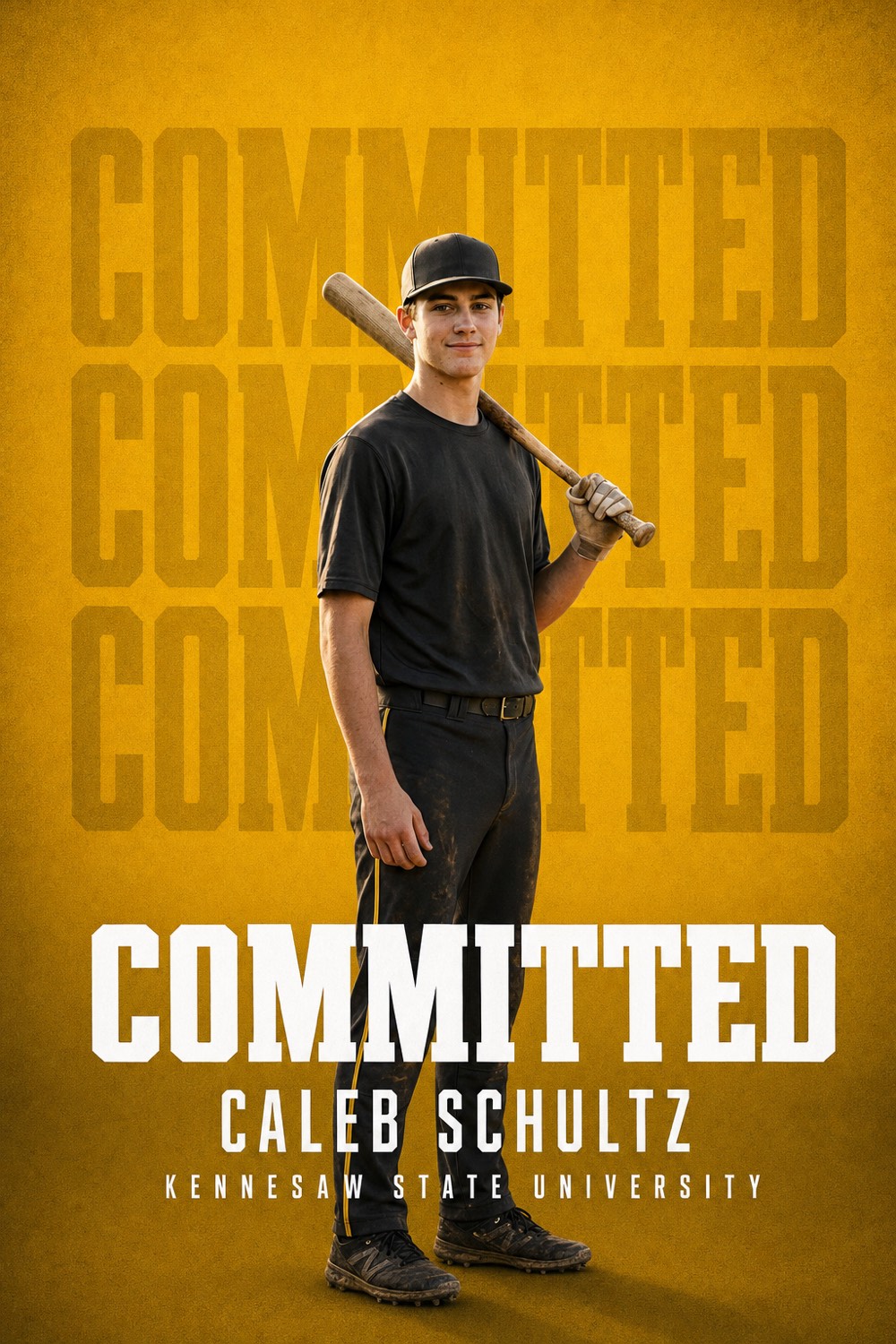
A Division I commitment is the post your high school, your club and every recruiting account in your state will share, so it should look like it came from the program itself. CommitGraphics turns one action photo into a finished D1 commitment graphic in the school's real colors, with COMMITTED across it and your name and class year placed exactly as you type them.
Enter your name, class year, school and state. The engine pulls in the program's colors and identity, whether that is a Power Four school or a mid-major like Kennesaw State, Coastal Carolina or North Alabama. It works for every Division I sport, from football and basketball to rowing and track.
Most D1 athletes post twice: COMMITTED the day the verbal is public, and SIGNED the day the paperwork clears. Both come from the same pack, and each download is sized for Instagram, Story, square and X.
A minute from done
Your details
Name, position and the year you graduate high school. Use the position you were recruited for; the caption carries the rest.
Your school
Type the school and its state. Real colors and identity are pulled in automatically for every Division I conference.
Your photo
One action shot with your face visible, from the front or slightly to the side.
Make it official
Two finished designs per tap. Regenerate until it is the one, then post it the moment your coach says the commitment is public.
Built for D1
The school's actual palette and a design at the level of a team creative department, so the repost from the program's account fits right in.
A verbal commitment and a signing are two different days. One pack makes both graphics, in the same look if you want them to match.
Football, basketball, baseball, softball, soccer, volleyball, lacrosse, track, swimming, golf, tennis, wrestling, hockey and the rest.
Instagram post, Story, square and X in one download for your page, your club and the accounts that repost commits.
Years of work for one post. It should look like Division I.
The CommitGraphics difference
When D1 commits sign in 2026-27
Every sport except football: November 11, 2026
For the class of 2027, Division I signing opened on Wednesday, November 11, 2026 for baseball, softball, soccer, volleyball, lacrosse, track, swimming, golf, tennis, wrestling, hockey and every other sport except football. There is no single closing date; each school's aid policy sets how late it will sign you, and plenty of D1 athletes sign in the spring.
Basketball
An early week from November 11 to 18, 2026, then a regular period that opens April 14, 2027.
Football
The early signing period is December 2 to 4, 2026 for FBS and FCS, and the traditional National Signing Day is Wednesday, February 3, 2027. The details are on the football signing day page, and the full table for every sport and division is on the signing day dates page.
Committed versus signed
A verbal commitment is your word
A Division I commitment starts as a verbal: you tell the coach you are coming, and the coach holds your spot. It is not binding on either side, which is why the graphic says COMMITTED and why coaches ask you to wait for their go-ahead before you post.
Signing makes it official
The National Letter of Intent ended in October 2024. What you sign now is the school's written offer of athletics aid, and for walk-ons, whatever agreement the school uses. Post SIGNED once the compliance office confirms the paperwork is in, which can be the same afternoon or a few days later.
Walk-ons and preferred walk-ons
A preferred walk-on spot at a Division I program is announced the same way. COMMITTED is the honest headline, and nobody reading the post needs the scholarship details.
Shooting a D1 commit photo
Face to the camera, mid-action
The best commit photos are an action shot from the front or slightly to the side with your face visible: a swing, a shot, a sprint, a catch. Ask whoever is shooting to hold the burst and pick the frame where you are looking up.
High-school and club photos both work
You do not need a photo in the college's uniform. The engine replaces the background and renders the kit in your new school's colors, so a high-school or travel-team photo is fine.
Light and glare
Shoot early or late in the day, or under even indoor light. A cap brim at noon or a face in full shade is the one thing the engine cannot fix.
Class year, position and the caption
Use the year you graduate high school as the class year, and the position you were recruited for. Thank the coaches, the club and the family in the caption rather than on the graphic; the caption guide has lines that fit. If you posted offer graphics along the way, the same app made those, and if the school is Division II, Division III or a junior college, there are pages for D2, D3 and JUCO commits too.
Questions, answered
How do I make a D1 commitment graphic?
Download CommitGraphics, enter your name, class year, school and state, and add one action photo. The app designs the graphic in the school's real colors in about a minute and gives you two finished designs per tap.
When do Division I athletes sign in 2026-27?
Every sport except football opened on Wednesday, November 11, 2026. Basketball has an early week from November 11 to 18 and a regular period from April 14, 2027. Football signs December 2 to 4, 2026 and from February 3, 2027.
Should my D1 graphic say COMMITTED or SIGNED?
COMMITTED when you give the coach your verbal and it is public, SIGNED the day your written offer of athletics aid is signed and confirmed. One pack makes both.
Does it work for mid-major and smaller D1 schools?
Yes. Any school renders. Enter the school and its state and the engine pulls in its real colors and identity, for Power Four programs and every other Division I conference.
Can a preferred walk-on post a commitment graphic?
Yes. A walk-on or preferred walk-on spot is announced the same way as a scholarship commitment, and COMMITTED is the accurate headline.
What photo works best for a D1 commit edit?
A sharp action shot from the front with your face visible. High-school and club photos work; the engine replaces the background and renders the uniform in your new school's colors.
Every moment covered
Division I, official.
Download CommitGraphics and make the announcement look like the program made it.
One-time packs, no subscription · commitgraphics.com