Basketball commitment graphics.
From the AAU circuit to the announcement post — broadcast-grade in about a minute.
Free to download · No account · Any school, any level
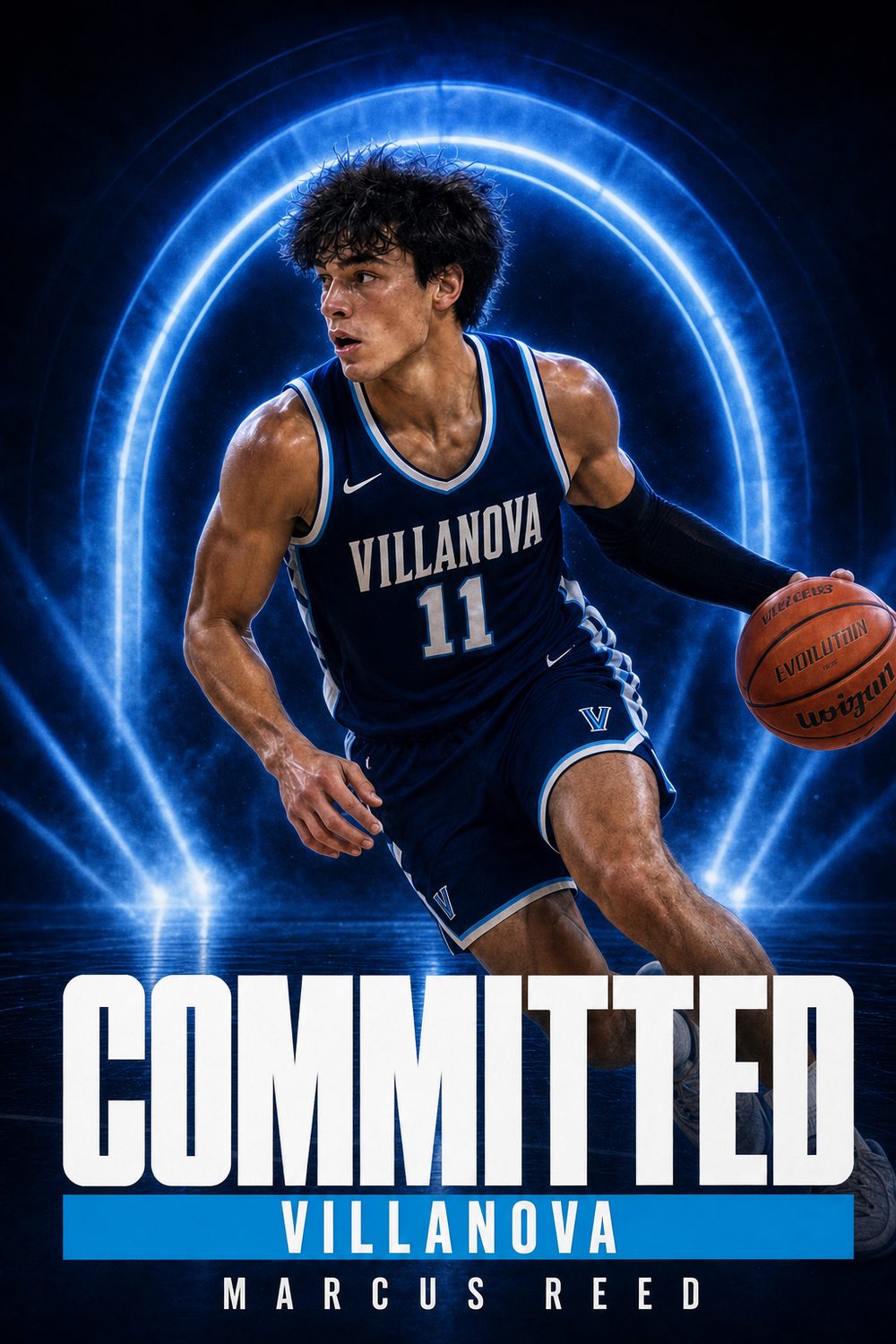
Basketball recruiting lives online. Offers drop on X, rankings move after every AAU live period, and when you finally commit, the announcement graphic is the post that gets pinned, quoted, and screenshotted by every fan page covering your class. It has to look like it belongs on a broadcast.
CommitGraphics turns one game photo — a pull-up, a drive, a block, a celebration — into a finished basketball commit edit with primetime energy — designed around your photo and your new school’s colors rather than dropped into a template.
Guards, wings, bigs; boys and girls; varsity, prep, and club — and it covers the whole journey, from the first offer announcement to signing day in November or April.
A minute from done
Your details
Name, position — guard, wing, or big — jersey number, and class year, exactly as they should read on the post.
Your school
Type the school and its state. Real colors and identity come in automatically, no design work needed.
Your photo
One action shot — a jumper at release, an and-one drive, a chase-down block. Gym lighting is fine.
Make it official
A finished graphic per tap. Regenerate until it's the one, then post it before the group chat leaks it.
Built for hoops
Every generation is built from scratch — type, lighting and composition all change with the photo you give it.
High school, prep school, JUCO, NAIA, D3 to D1 — men's and women's hoops, every class year.
Your new school's actual colors, pulled in automatically the moment you type the name.
Instagram post, Story, square, and X sizes in one download — the same graphic everywhere the news breaks.
Fan pages break the news in minutes. Your announcement can be broadcast-grade just as fast.
The CommitGraphics difference
Shooting a basketball commit photo
Gym light is the whole problem
Basketball photos are harder than they look, and the reason is almost always the gym. High school gyms are lit with overhead fluorescents that create a yellow-green cast and drop hard shadows under the brow and chin. If you have any choice of photo, pick one shot in a well-lit gym or an arena rather than an auxiliary court.
If your only option is a dim gym, favour a photo where you are moving toward the camera and near a baseline light source, and avoid frames where you are directly under a basket in shadow. The artwork can correct a lot of colour, but it cannot invent detail that the phone never captured.
Jersey contrast beats everything
A white home jersey against a light gym wall is the single most common problem in basketball commit photos — the athlete visually dissolves into the background. Road darks against a bright court, or a home white against a dark crowd, give the design a clean silhouette to build around.
Frame the moment, not the ceiling
Shots from the corner of the baseline, roughly at chest height, are the most usable. A drive to the rim, a pull-up with the follow-through held, a rebound at the apex, or a post seal all read instantly as basketball. Avoid photos taken from the top row of the bleachers, where the athlete becomes small and the ceiling takes half the frame.
Above the rim reads best
If you have any photo where your feet are off the floor, use it. Basketball is a vertical sport and a commitment graphic built around a player in the air has an energy that a set-shot photo cannot match. A dunk, a block at full extension, or a rebound taken over traffic will always outperform a standing portrait.
The basketball recruiting calendar
Basketball recruiting is driven by the summer circuit and punctuated by two signing windows, which makes the timing of an announcement genuinely strategic.
The AAU circuit does the work
For most players, the offers that matter arrive during and immediately after the spring and summer travel season. Coaches see far more circuit basketball than high school basketball, which is why a strong July can reshape an entire recruitment in a matter of weeks — and why offer graphics tend to cluster in the back half of the summer.
The November early signing period
Basketball's early signing period sits in November, well before football's, and it is where the large majority of Division I players sign. If you have committed by the fall of senior year, November is your signing moment and the SIGNED graphic belongs to that week.
The spring signing period
The late period opens in April and runs through the spring. It is where the board finally settles: players who waited on an offer, reclassified, or came off the board late all sign here. It is a genuinely busy announcement window and often gets less social-media attention than it deserves.
Reclassification and prep years
Basketball has more reclassification than any other high school sport — players moving up a year or taking a post-graduate year at a prep school. If you reclassify, your class year changes, and the graphic should say the year you will actually enroll, not the class you started high school with.
The portal moves fastest of all
College basketball's transfer portal turns over rosters in a matter of weeks each spring. Portal commitment posts are expected within a day or two of a decision, which is precisely the scenario a one-minute graphic is built for.
Every position on the floor
Basketball positions are increasingly written as numbers, and the graphic renders whatever you type. Point guards are PG or simply "Guard"; combo guards frequently use G or CG; shooting guards SG. Wings are commonly W or WING, and the positionless label "Guard/Forward" or G/F is now completely standard.
Forwards use F, SF, PF, or the number 4; centres use C or 5. Many programs now prefer the numeric shorthand entirely — "Combo Guard," "Stretch 4," and "Rim Runner" all appear on real commitment graphics and all render cleanly.
Every level is covered the same way: Division I, Division II, Division III, NAIA, JUCO, and prep. Women's and men's programs are treated identically — the design is built around your school's colours and your photo, not the division or the gender of the program.
Questions, answered
Are these basketball committed graphics free to make?
The app is free to download; a one-time pack unlocks clean HD basketball graphics with no watermark — no subscription, no account. CommitGraphics is an AI commitment graphic maker, so you upload one action photo and it builds the commitment edit around you: your school's real colours, your name, and a COMMITTED headline. Every create returns two designs to choose from.
How do I make a basketball commitment edit?
Open CommitGraphics on iPhone, enter your name, position, class year, and your new school with its state, add one game photo, and tap generate. About a minute later you have two finished basketball commitment graphics ready to post.
What photo should I use for a basketball commit graphic?
A sharp shot where you're the clear subject — a jumper at release, an attack off the dribble, or a big celebration. Typical gym lighting works; just avoid heavily cropped or blurry screenshots.
Does it work for AAU and club players announcing offers?
Yes. The OFFERS headline graphic is built exactly for that — announce each offer as it comes in during live periods, then use COMMITTED and SIGNED when you make it official.
Can I use it for both November and April signing periods?
Yes. Whether you sign early in November or in the spring period, the SIGNED graphic is ready whenever you are, so you can prepare it ahead of the day.
Every moment covered
Announce it like a primetime intro.
The commitment post every fan page will repost deserves broadcast polish. Download CommitGraphics and make it official.
One-time packs, no subscription · commitgraphics.com