Softball commitment graphics.
Years of travel ball led to this post. Make it look like a magazine cover.
Free to download · No account · Any school, any level
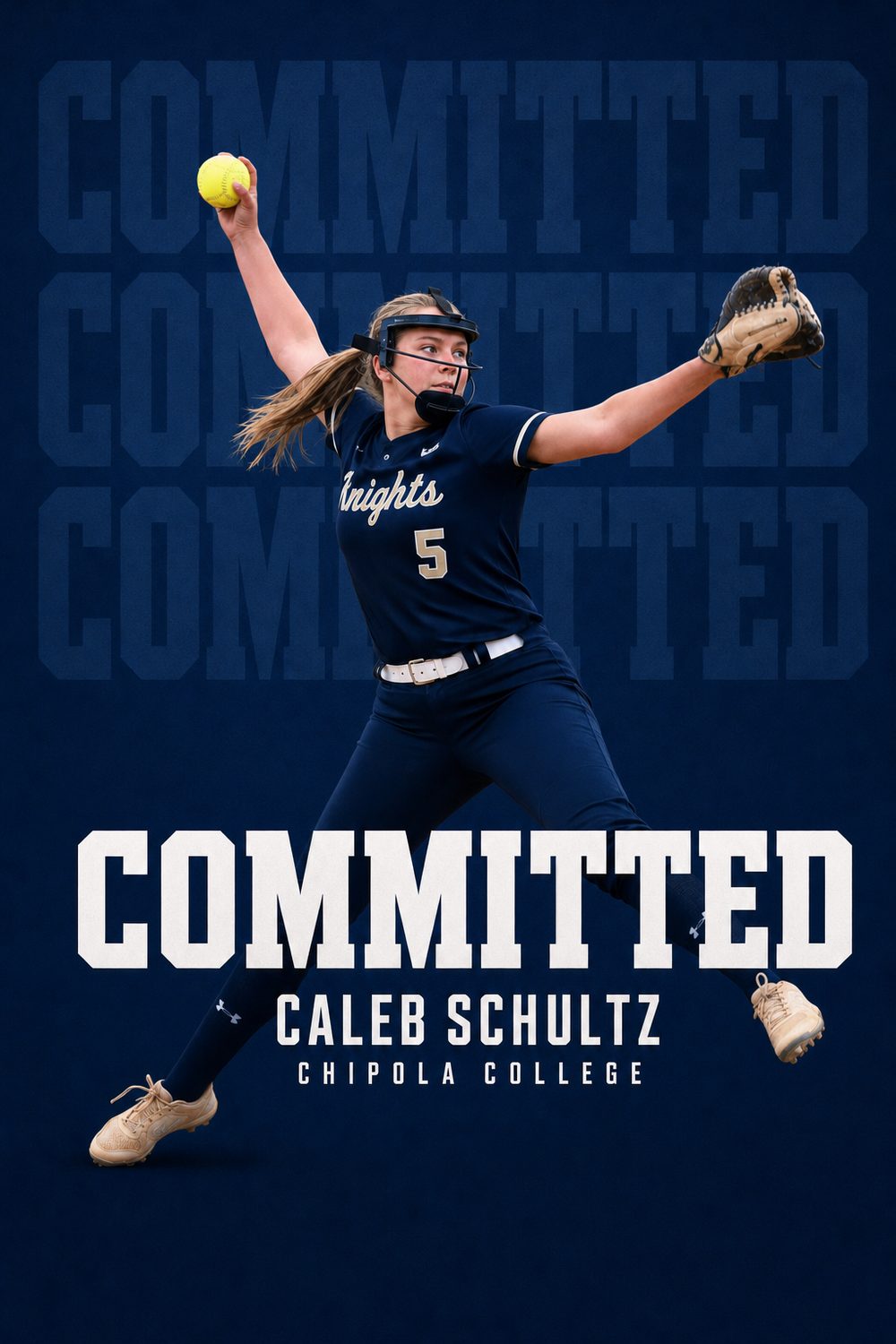
Softball commitments are earned the long way — years of travel ball, showcase weekends, camps, and recruiting emails before September 1 even lets coaches call back. When the decision finally comes, the announcement post is how teammates, travel orgs, and the school's fans all hear it at once. It should look as polished as the work behind it.
CommitGraphics turns one action photo — a windmill release, a swing, a diving play at short — into a finished softball commitment graphic, designed around your photo and your new school’s colors rather than dropped into a template.
Pitchers, catchers, middles, corners, and outfielders — from 12U travel commitments years out to November signing week, plus offer announcements along the way.
A minute from done
Your details
Name, position — P, C, SS, utility — jersey number, and class year, exactly as they should appear.
Your school
Type the school and its state. Its real colors and identity load automatically.
Your photo
One action shot: the release point, contact at the plate, or a web gem. Tournament photos from the fence work great.
Make it official
A finished graphic per tap. Regenerate until it's perfect, then tag your travel org and post.
Built for softball
Every generation is built from scratch — type, lighting and composition all change with the photo you give it.
Club and travel orgs, high school varsity, JUCO, NAIA, D3 through D1 — every path to the next level counts.
The school you worked years for, in its actual colors — automatically, with zero design skills.
Instagram post, Story, square, and X in one download — one graphic for your page, your org's page, and mom's repost.
Years of travel ball deserve better than a template. This is the cover-story version.
The CommitGraphics difference
Shooting a softball commit photo
The circle is the best frame in the sport
For pitchers, the moment of release — arm at the bottom of the circle, front foot planted, dirt kicking up — is the most recognisable image in softball and the one that makes the strongest graphic. Shoot from slightly off to the glove side rather than straight on, so the body opens toward the camera instead of hiding behind the arm.
Position players: catch the load, not the follow-through
For hitters, the frame just before or at contact carries far more tension than the follow-through. Shoot from the dugout-side angle at roughly waist height. For fielders, a throw across the body from the infield or a full-extension catch in the outfield both read instantly and give the design a strong diagonal to work with.
Golden hour beats midday
Softball is played in a lot of harsh afternoon sun, which produces squinting, deep eye shadows, and blown-out white uniforms. Late-afternoon and evening games — or tournament games under lights — give softer, warmer light that the artwork can do much more with. If you have a photo from an evening game, use it over a brighter midday one.
Watch the fence line
A chain-link backstop directly behind the athlete creates a busy pattern that competes with the design. Photos where the background is the outfield, the sky, or the stands are cleaner. The artwork rebuilds the background entirely, but a simpler starting frame produces a more accurate result.
The softball recruiting calendar
Softball recruiting was reshaped by NCAA rule changes designed to slow down early verbal commitments, and the current calendar is genuinely different from what it looked like a decade ago.
Contact opens in junior year
Division I coaches cannot contact recruits until September 1 of junior year. In practice this compresses the entire recruiting cycle into a much shorter window than it used to occupy, and it means a large share of offers arrive during junior year rather than in eighth or ninth grade as they once did.
Travel ball is where you are seen
Recruiting happens almost entirely at travel tournaments, showcases, and camps rather than at high school games. Summer and fall exposure events drive the offers, which is why offer announcements tend to cluster around the end of a travel season.
The November signing period
Softball follows the standard NCAA early signing period in November, and this is where most Division I players formally sign. If you committed during junior year, the November of senior year is when the verbal becomes a signature — and the SIGNED graphic is for that day.
The spring window
The late signing period opens in April and runs into the summer. It is heavily used by Division II, Division III, NAIA, and JUCO programs, and by athletes whose recruitment came together later. A spring signing is not a lesser signing.
Verbal versus signed
Because softball verbals often happen a year or more before signing, most athletes end up posting twice: once for the commitment, once for the signing. They are genuinely different milestones and deserve different graphics.
Position by position
Softball positions render exactly as you enter them. Pitchers use P or RHP; catchers C. Infielders commonly use 1B, 2B, SS, and 3B, while the umbrella labels INF and MIF (middle infield) are extremely common on commitment graphics, since many recruits are signed as flexible infielders.
Outfielders use OF, or LF, CF, and RF when a specific spot matters. Utility players — genuinely common in softball — use UTIL or ATH, and slappers sometimes note it explicitly. Two-way players frequently write something like "P/1B" or "UTIL/P," which renders cleanly.
Every level is treated identically: Division I, Division II, Division III, NAIA, and JUCO. Travel organisation and high school program can both be included, which matters in a sport where the travel team is often the more recognised name.
Spin, slapping, and the short game
Softball evaluation looks nothing like baseball's. Because the circle is 43 feet from the plate and pitchers throw underhand, the sport prizes movement over raw velocity — a riseball that jumps through the zone, a drop that falls off the table, a changeup that holds its arm speed. Pitchers are frequently recruited on the strength of a single dominant pitch and the ability to throw it for a strike under pressure.
Workload is the other defining difference. It is common for one pitcher to throw an entire weekend tournament, which is why durability and recovery are explicitly evaluated, and why staffs recruit multiple arms per class.
The slap game has no baseball equivalent
Left-handed slappers — athletes who move through the box and put the ball in play with elite speed — form an entire recruiting category of their own. Slap technique, home-to-first times, and bunting ability are evaluated separately from power hitting, and many recruits are signed specifically as slappers.
Where the season ends
The Women's College World Series in Oklahoma City is the sport's showcase event, and its visibility has grown the recruiting pipeline considerably. Professional opportunities after college have expanded too, which increasingly factors into where athletes choose to commit.
Questions, answered
Are these softball committed graphics free to make?
The app is free to download; a one-time pack unlocks clean HD softball graphics with no watermark — no subscription, no account. CommitGraphics is an AI commitment graphic maker, so you upload one action photo and it builds the commitment edit around you: your school's real colours, your name, and a COMMITTED headline. Every create returns two designs to choose from.
How do I make a softball commitment graphic?
Open CommitGraphics on iPhone, enter your name, position, class year, and your school with its state, add one action photo, and tap generate. In about a minute you get two finished softball commitment graphics ready to post.
What photo works best for a softball commit post?
Action wins: a pitcher at release, a hitter at contact, a defender mid-play. Photos shot through the fence on a phone are fine — pick the sharpest one where you fill the frame.
Can travel and club players use it before senior year?
Yes. Many softball players commit as sophomores or juniors — the graphic works for any class year, and the OFFERS version covers camp invites and offers before the decision.
Does it cover signing day in November?
Yes. When national signing week arrives, the SIGNED headline graphic is ready — same photo or a new one, your school's colors, done in about a minute.
Every moment covered
Make the years official.
Every showcase weekend was for this moment. Download CommitGraphics and announce it right.
One-time packs, no subscription · commitgraphics.com