Game day graphics.
Your team, the opponent, the time and the place. One minute, posted before warmups.
Free to download · No account · Any school, any level
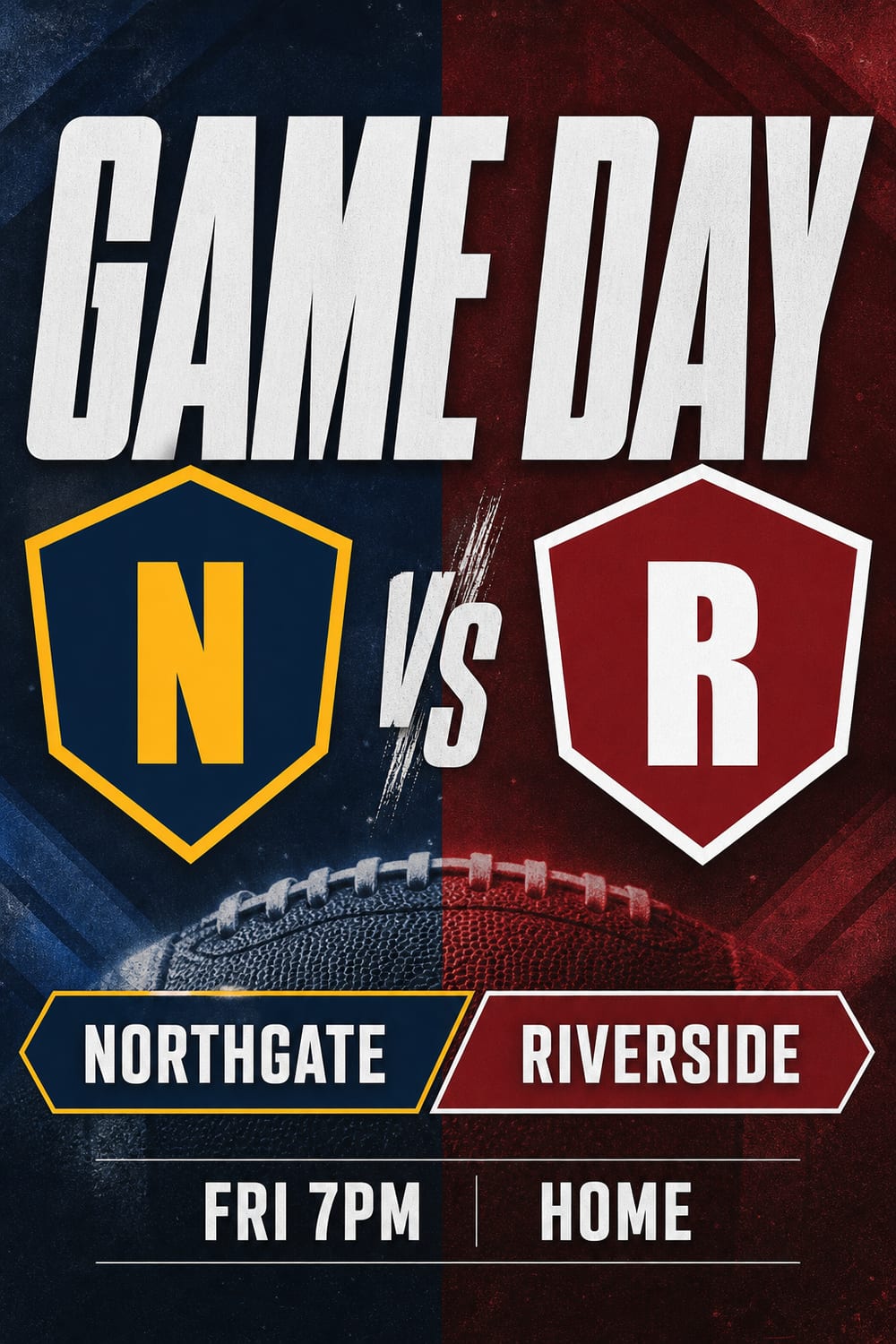
A game day post goes up every week of the season, and it is usually made at the last minute by a coach, a team mom or a player with a phone. CommitGraphics makes it in about a minute: type your team and the opponent, add the date and time and where it is, upload the two logos, and the engine designs a finished matchup graphic in your colors.
The Game Day tab has four kinds of post. MATCHUP is the pre-game graphic. SCORE is the final score after the whistle. STATS is a player's stat line. NEWS is any headline you type, from Player of the Week to a playoff announcement.
It works for any sport and any level: high school varsity and JV, middle school, club and travel teams, and college programs without a creative staff. Each create gives you two finished designs, and the same one-time packs cover Game Day posts and commitment graphics.
Pre-game in a minute
Game Day, then MATCHUP
Open the app, tap the Game Day tab and pick MATCHUP.
Both teams
Your team and the opponent, exactly as they should read. Upload both logos if you have them.
When and where
Date and time (for example "Fri 7PM") and the location ("Home", "at Riverside", a field name).
Create and post
Two finished designs per tap. Pick one, download in the size you need, and post it.
Built for the weekly post
Team names, times and places are placed exactly as you type them. Nothing is guessed or misspelled by the design.
Both logos go into the design. Without one, the look is built from the team name and colors.
Matchup before the game, final score after it, a stat line for the player of the night and a news headline for everything else.
Football, basketball, baseball, softball, soccer, volleyball, lacrosse, hockey, wrestling and more, varsity to club.
The game is at seven. The graphic should be up before the bus leaves.
The CommitGraphics difference
What a game day graphic needs
Open CommitGraphics, tap Game Day and choose MATCHUP. Every word on the graphic comes from what you type, spelled exactly as you type it, so check the names before you tap create.
The essentials
Both team names, the day and the time, and where the game is. That is everything a fan needs to show up, and it is everything the matchup graphic asks for. Add the date in the form people use on your team page: "Fri 7PM", "Sat 1:00", "Oct 31 · 7:00".
Logos
Upload your team logo and, for score and matchup posts, the opponent's. The engine places them in the design. No logo? It builds the look from the team name and colors instead.
A photo is optional
Add an action shot and the player becomes the centerpiece. Leave it out and the graphic is designed around the teams, the type and the colors, with no person in it. The app never invents an athlete.
When to post it
The morning of, or the night before
Most teams post the matchup the night before or the morning of the game, then share it to a Story an hour before kickoff or tip-off. Big games (rivalry week, homecoming, senior games, playoffs) are worth a post earlier in the week too.
Then the result
The same tab makes the final score graphic after the game. Using the same logos keeps the week's posts looking like a set.
For coaches, parents and players
Coaches and team parents use it for the team account; players use it for their own page. There is no account to set up and nothing to learn: type, create, post. Free to download. Making graphics takes a one-time pack: $14.99 for 20 finished graphics, $24.99 for 40 or $39.99 for 60, the same packs commitment graphics use. Nothing renews. The Team / Program Pack of 60 is the one most teams pick for a season of weekly posts.
Recruiting season, the same app makes commitment graphics and offer graphics for the players, and coach offer graphics for college programs.
Questions, answered
How do I make a game day graphic?
Download CommitGraphics, tap Game Day and choose MATCHUP. Enter your team and the opponent, the date and time and the location, upload the logos if you have them, and tap create. You get two finished designs in about a minute.
Can I add both team logos?
Yes. Upload your team logo and the opponent's and the engine places both in the design. Without a logo, the look is built from the team name and colors.
Do I need a player photo?
No. The photo is optional. With one, the player is the centerpiece; without one, the graphic is designed around the teams and the type with no person in it.
Which sports does it work for?
Any sport: football, basketball, baseball, softball, soccer, volleyball, lacrosse, hockey, wrestling, track and more, from middle school and club to varsity and college.
How much does it cost?
The app is free to download. Graphics use one-time packs: $14.99 for 20, $24.99 for 40 or $39.99 for 60. There is no subscription.
What else is in the Game Day tab?
Four post types: MATCHUP before the game, SCORE for the final, STATS for a player's stat line and NEWS for any headline, such as Player of the Week.
Every moment covered
Game day, posted.
Download CommitGraphics and make this week's matchup graphic in a minute.
One-time packs, no subscription · commitgraphics.com