Commitment graphic templates.
Every template has the same problem: the athlete is dropped into a design that was not built for their photo. Here is what to look for, and the faster route.
Free to download · No account · Any school, any level
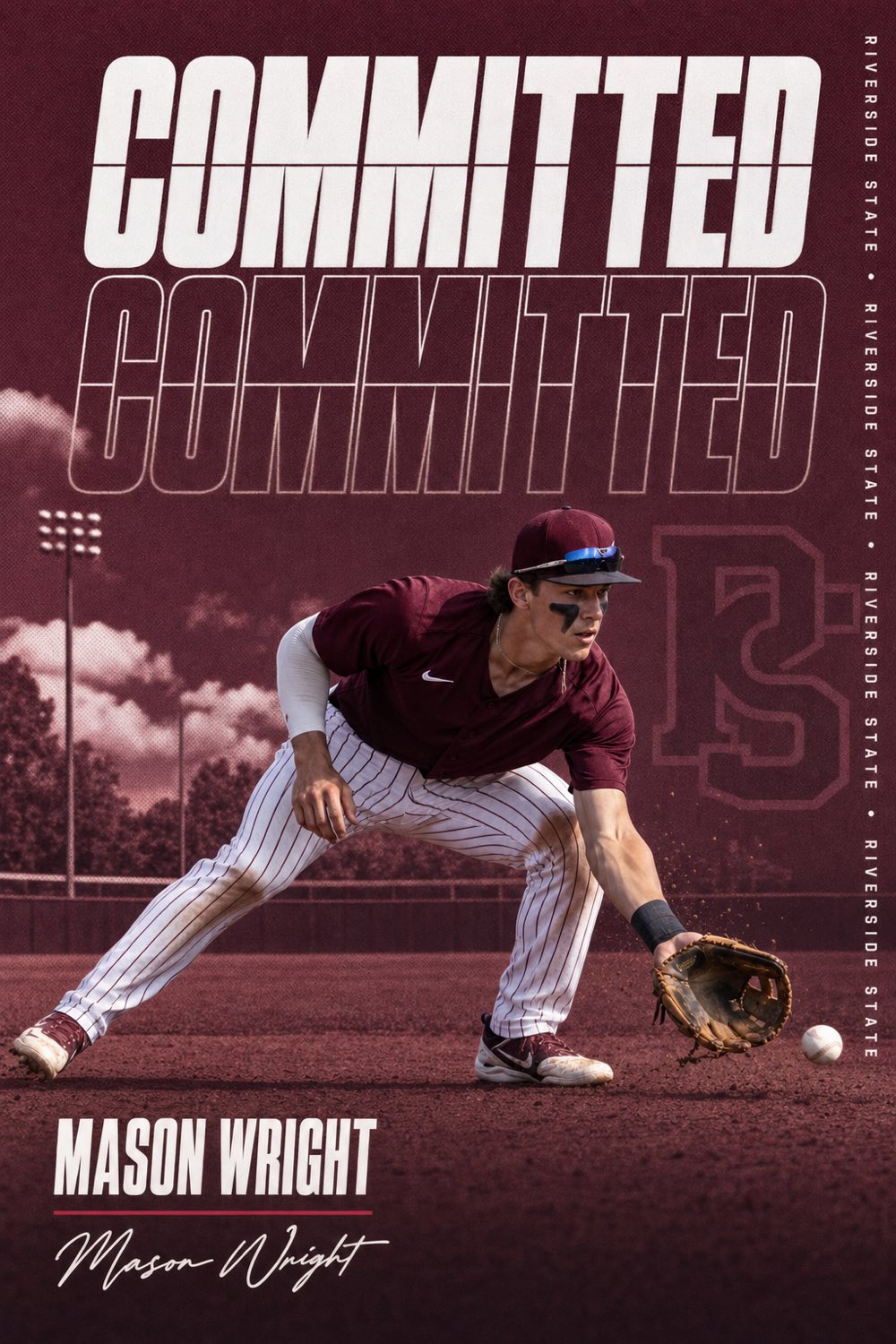
A commitment graphic template is a fixed layout — a place for a photo, a place for a name, a big COMMITTED across the top — that you fill in yourself in Canva, Photoshop or a phone app. Thousands of athletes use them every year, and you can spot every one of them: the photo is squeezed into a box that was drawn for someone else, the school colors are approximated, and the type sits where the template put it, not where the photo needs it.
A designed commit edit works the other way around. The layout is built around your photo — where your body is, where the light comes from, where there is room for the headline — and the school's real colors drive the palette. That is what recruiting pages and athletic departments post, and it is why their graphics look official and template graphics look homemade.
CommitGraphics does the designed version automatically. One action photo, your name, your school and its state, and about a minute later you have two finished designs that were generated for that photo, not fitted to it. This page covers what a good template includes, so you can judge either route, and how the two compare.
A minute from done
Your details
Name, position, jersey number and class year, exactly how they should read.
Your school
Type the school and its state. Real colors and identity are pulled in automatically.
Your photo
One action shot. The design is built around it, so there is no box to fit.
Make it official
Two finished designs per tap. Regenerate until it's the one, then post.
Template vs. designed
No cropping yourself into a placeholder. The composition, type placement and lighting follow the shot you give it.
Templates ask you to pick colors. The engine looks up the program's actual palette from the school and state.
Fourteen styles across twelve sports, generated fresh. Two athletes at the same school never get the same graphic.
$14.99 for 20 finished graphics. Canva Pro is $120 a year and still leaves the design to you.
A template is a design someone else made for a photo they never saw. The good ones are made for yours.
The CommitGraphics difference
What a good commitment graphic includes
Whether you use a template or an app, the finished graphic needs the same five things, and the order matters.
1. One clear headline
COMMITTED, SIGNED or OFFERED, in heavy condensed capitals, large enough to read as a thumbnail in a feed. One word. Templates that add "I am proud to announce" as a second headline bury the news.
2. Your name, spelled exactly
Your full name in the second-largest type, with position and class year small beneath it. Misspelled names are the most common template mistake because the text box was sized for a shorter name; check it at full size before posting.
3. The school, identified two ways
The school's real colors in the background and either the wordmark, a monogram or the name spelled out. Real colors are the tell: a navy that is slightly off reads as fake to anyone who follows the program.
4. An action photo, cut out clean
You, mid-play, in focus, filling the frame, with the background removed so the design can sit behind you. A team photo or a posed portrait cropped into a template is the second most common tell.
5. The right size for the post
A 4:5 portrait for the Instagram feed, a 9:16 for the Story, a square for the grid, and a 16:9 for X. A template gives you one; you make the rest yourself.
Canva, Photoshop, and the DIY route
Canva has hundreds of "commitment announcement" templates, and for a text-only announcement they are fine. The trouble starts with the photo: Canva's background remover is decent, but the layout does not move to fit your cutout, so you end up shrinking yourself to fit the box. Photoshop templates from Etsy and design pages are better, usually built by people who make real recruiting graphics, but they assume you know how to mask, match colors and set type, and they run $10 to $40 for one layout.
A custom edit from a designer on Instagram costs $30 to $80, takes a few days, and is usually excellent. That is the standard the app is measured against: the same designed-for-your-photo result, in a minute, at under a dollar per graphic on a pack. The best commitment graphic apps page compares all of these honestly, including where a designer still wins.
Templates by moment
Commitment. The standard: COMMITTED, your photo, the school. Examples by sport on the commitment post page.
Offer. OFFERED or a wall of offers with each school's logo; see college offer graphics.
Signing day. SIGNED, posted the morning of, before the program's class graphic; see signing day graphics and the 2026-27 dates.
Transfer. TRANSFERRED, in the new school's colors, on the transfer portal graphics page.
Questions, answered
Is there a free commitment graphic template?
Canva has free commitment templates, and the CommitGraphics app is free to download with free watermarked previews. The difference is that the app designs the graphic around your photo instead of giving you a fixed layout to fill in.
What size should a commitment graphic be?
A 4:5 portrait (1080 by 1350) for the Instagram feed is the standard. Also make a 9:16 Story, a square and a 16:9 for X. CommitGraphics exports all four from one graphic.
Can I make a commitment graphic in Canva?
Yes, and for a text announcement it works. For a photo graphic you will need to remove the background, match the school colors by hand and resize yourself into the template's photo box, which is where most Canva commitment graphics start to look like templates.
Does the app use templates?
No. Each graphic is generated for your specific photo and school, so the composition, type placement and colors are different every time. There are fourteen styles across twelve sports, and two athletes at the same school will not get the same design.
How much does a designed commitment graphic cost?
A designer on Instagram charges $30 to $80 per graphic. A CommitGraphics pack is $14.99 one-time for 20 finished graphics, about 75 cents each, with no subscription.
Every moment covered
Skip the template. Get the design.
Built around your photo, in your school's real colors, in about a minute. Download CommitGraphics and make it official.
Preview before you buy · commitgraphics.com