Commitment edits.
Real examples by style and sport, what edit accounts charge, the free template route, and the app that makes football, baseball and basketball commit edits in your school's colors in about a minute.
Every sport · Every level · Updated 2026
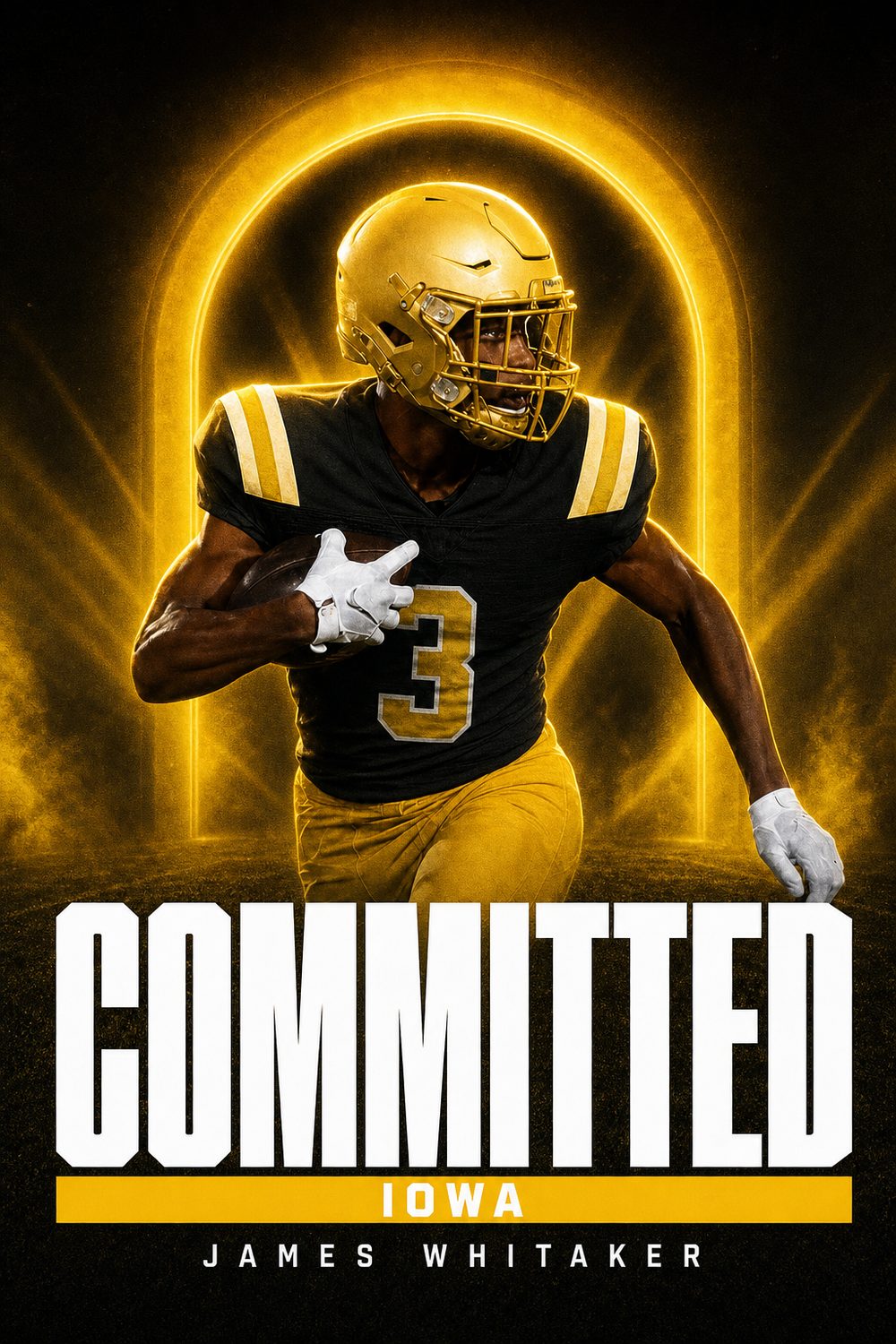
Six finished edits
Every one made in the app from a single action photo. The colors come from the school, not from a guess; the name is set as real type.


10 more edit styles
Added this season and modeled on the edits college creative teams post: one-color posters, cream magazine covers, state outlines, card frames and night-light looks. Same one photo, same minute.


"Commitment edit" is what athletes call the designed announcement image: the photo cut out, the school's colors behind it, COMMITTED across the front, name and class year set clean. The word comes from the edit accounts on Instagram that make them to order. This page explains what a good one looks like, the styles that get reshared, and every way to get yours, from a one-minute app to a custom designer.
What a commitment edit is
A finished graphic, not a filtered photo. The athlete is cut out of the original shot, placed over a designed background in the college's colors, and the announcement is set as real text: COMMITTED, the school, the name, position and graduation year. The same format covers offers (OFFERED) and signing day (SIGNED). Football commit edits are the most common, then basketball, baseball and softball, but every sport uses the same anatomy.
The styles that get reshared
- Editorial. Big headline behind the athlete, plenty of empty space, magazine feel. Reads at thumbnail size, which is why recruiting pages like it.
- Monochrome. A single flat school color, the school's wordmark ghosted huge behind a centred cut-out, white COMMITTED overlapping the legs.
- Monogram. A dark studio field with the school's giant initial behind the athlete and an italic white headline.
- Retro and graffiti. Textured, loud, usually daytime. Popular for football and track.
- Badge and scrapbook. Circular crest with a text ring, or taped-paper collage. Softer, good for softball and volleyball.
Whatever the style, the rules are the same: exact school colors, the athlete's face visible, nothing covering the jersey number, and every letter of the headline readable.
Four ways to get a commitment edit
1. An app that builds it for you. CommitGraphics takes one action photo plus your name, school, position and class year and returns two finished edits in the school's real colors in about a minute, sized for Instagram post, Story, square and X. No design work, no waiting. Free to download; finished graphics come in one-time packs from $14.99 for 20.
2. A commitment edit template. Canva, Adobe Express and PosterMyWall all have commitment templates. Expect an hour: removing the photo background, matching the colors by hex code, and exporting each size. Good if you enjoy designing or want to control every element.
3. An edit account. Hundreds of designers on Instagram and TikTok take orders: send a photo and details, get a finished edit back in a day or a few days, usually $15 to $60 per graphic. Quality varies with the designer; look at their recent work before paying.
4. A studio. Services like D1Graphics and Next Level Edits sit between an edit account and an agency: a set menu of styles, a fixed price per edit, and a stated turnaround. We compared the options honestly in the best commitment graphic apps and services.
Commitment edit templates
Searching for a commitment edit template usually ends at Canva, Adobe Express or a designer's Etsy listing. They work, with three catches: the background removal is on you, the school colors have to be matched by hex code (most templates ship in generic navy or black), and every size is a separate export. Budget an hour, and check the finished file at phone size before you post. If you would rather skip the hour, the app is the template: it already knows the school's palette and returns the post, Story and square versions together.
Football commit edits
Football commit edits are the most searched and the most reshared, because programs post class updates and recruiting pages repost every commitment in a graphic. The football edit that travels has a night-game feel, the athlete large and cut out cleanly, and COMMITTED readable at thumbnail size. Helmet on or off both work; a photo with the number visible is better. There is a full football commitment graphics page with position-by-position photo advice and the signing-period calendar.
Commitment edits by sport
Each sport has its own photo problems and its own calendar. We wrote a page for each: football, basketball, baseball, softball, soccer, volleyball, lacrosse, track and field and wrestling. For the moment after the commitment, see signing day graphics; for the moments before it, college offer graphics.
What to send a designer, or type into the app
- One sharp action photo, the original file, you clearly the subject
- Your name exactly as it should read, position or event, graduation class
- The college's full name and the state, so the colors resolve correctly
- The word: COMMITTED, OFFERED or SIGNED
Then post it the right way: graphic first, gratitude in the caption, program tagged. Our guides cover how to make a commitment graphic step by step and how to announce the commitment itself.
Make it official.
Which platform actually matters
Instagram is where recruiting lives. Coaches, recruiting reporters, and other athletes are all there, and reshares travel further than on any other platform. X still carries weight in football and basketball recruiting specifically, where reporters break commitments and the ecosystem is genuinely active. TikTok reaches the widest audience but is the least likely to reach college staffs.
If you only do one, do Instagram — feed post plus Story. If you do two, add X in football or basketball, and TikTok in anything else.
The carousel order that works
Lead with the commitment graphic. Follow it with one action photo, then one photo with family or your high school coach. That sequence gives the algorithm a strong first frame and gives people a reason to swipe, which increases the time spent on the post and therefore its reach.
Resist the urge to put fifteen photos in. Three to five is the range where people actually get to the end.
What to do in the first hour
Reply to comments. Early engagement determines how far a post travels, and a commitment post that gets forty replies in the first hour reaches dramatically more people than one that gets forty replies over three days. Reply to the reshares in your Story too.
Handling the schools you turned down
Message the coaches who offered you and whom you are declining before the post goes up — not after. It is a short conversation and it is the single most-respected thing a recruit can do in this process. Coaching staffs move between programs constantly, and the coach you decline this year may be recruiting your position at another school next year.
If you decommit later
It happens, and often. Coaching changes, roster changes, and better offers all cause it. If it happens, post a short and gracious note — thank the staff, do not explain in detail, and do not criticise the program publicly. Then make a new graphic when the next decision comes. Nobody in recruiting thinks less of an athlete for decommitting cleanly; plenty think less of one who does it messily.
A quick checklist
- Coaches and family told first, before anything is posted
- Program asked whether they have a preferred announcement date
- Graphic made in the school's real colours, correct class year and position
- Caption thanks first, announces second, and names the school in words
- Athletics account, high school account, and club account all tagged
- Feed post and Story posted at the same time, each sized correctly
- Bio updated the same day
- Comments answered in the first hour
Questions, answered
Is there a free commitment edit template?
Yes. Canva and Adobe Express both have free commitment templates. The work is in the details: cutting out your photo, matching the school's exact colors and exporting each size, which is why most athletes budget about an hour. The app does those steps for you in about a minute.
How do I get a football commit edit?
Send one sharp game photo, your name, position, class year and the college to an edit account, or type the same details into CommitGraphics and get two finished football commit edits back in about a minute, in the school's real colors.
What is a commitment edit?
A designed announcement graphic: the athlete cut out of an action photo, placed over a background in the college's colors, with COMMITTED, the school, the athlete's name, position and class year set as real text.
How much does a commitment edit cost?
Edit accounts on Instagram typically charge $15 to $60 per graphic with a turnaround of a day or more. Templates are free but take about an hour. CommitGraphics makes two finished edits in about a minute; finished graphics come in one-time packs from $14.99 for 20.
Can I make a commitment edit myself?
Yes. Either use an app like CommitGraphics that designs it from one photo, or a Canva-style template where you remove the background, match the school colors and export each size yourself.
What is the best commitment edit style?
Editorial and monochrome designs read best at feed size and get reshared most by recruiting pages. Loud retro or graffiti styles work for football and track. Whatever the style, exact school colors and a readable headline matter more.