How to make a commitment graphic.
How to make a college commitment graphic: what to put on it, the right photo, exact school colors, sizes for Instagram and X, and three ways to build it — app, template, or designer.
Free guide · Updated 2026
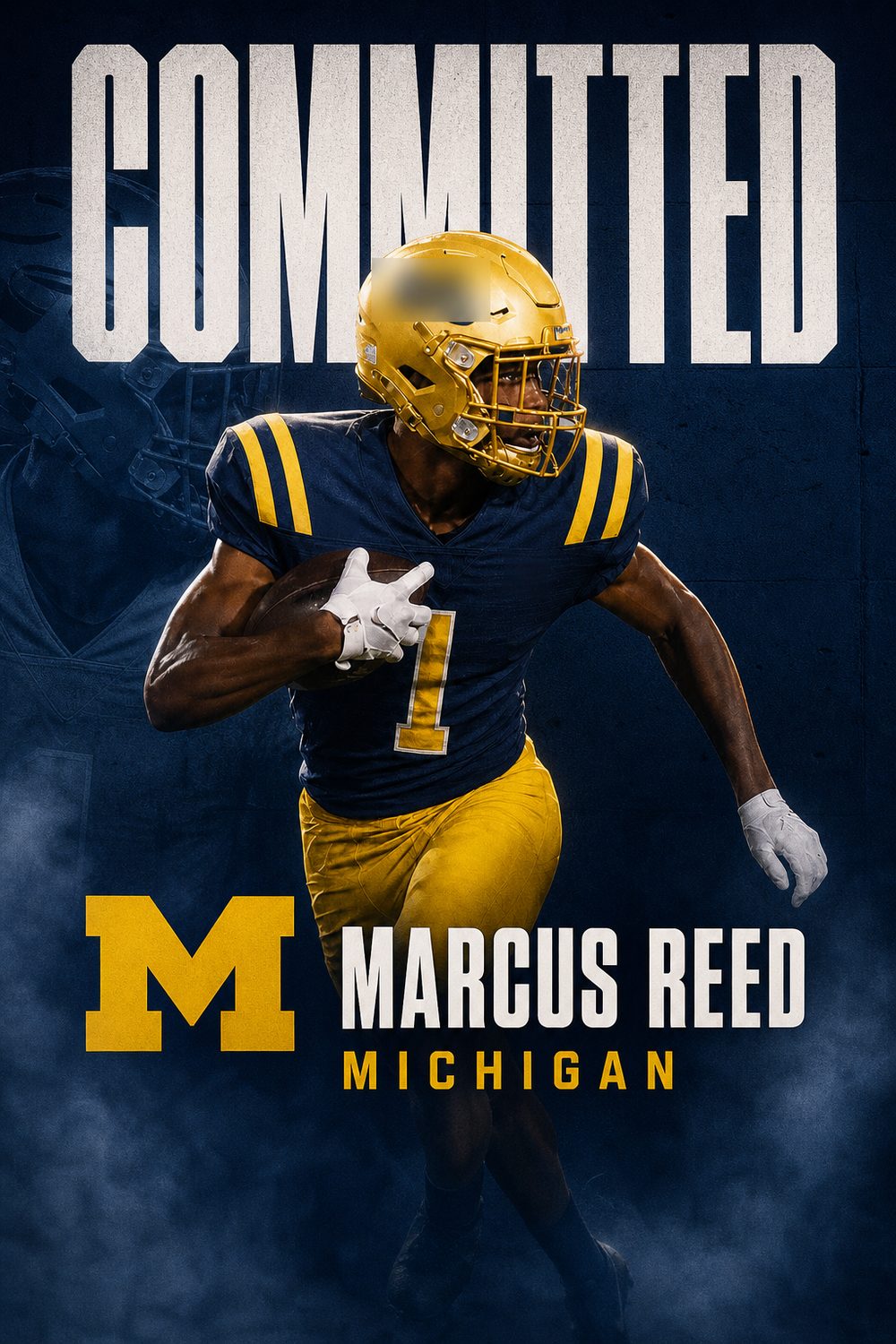
A commitment graphic is the designed image an athlete posts to announce where they are going to play in college. It is the post that gets reshared by the program, the high school, and recruiting pages, so it is worth getting right. This guide covers what belongs on it, how to build one three different ways, and the mistakes that make a graphic look homemade.
1. Decide what the graphic is announcing
The word on the graphic should match the moment. COMMITTED is for a verbal commitment. SIGNED is for the day you sign your written offer of athletic aid. OFFERED or OFFERS is for announcing scholarship offers before you decide. Mixing these up is the most common error recruiting accounts notice, so pick the one that is actually true today. If you are not sure what committing means yet, read what it means to commit to a college first.
2. Pick one strong photo
One photo carries the whole design. Use a sharp action shot with you clearly the subject, ideally mid-play with your face visible and nothing important cut off at the edges. Vertical or square framing crops best. Avoid team photos, heavy filters, and screenshots of screenshots. If the only good shot has a busy background, that is fine when you use a tool that cuts you out, but a clean background is safer for a template.
3. Get the school colors exactly right
Nothing says amateur like the wrong shade of the school's color. Most athletic departments publish their brand colors; search the school name plus "brand guidelines" or "athletics colors" and use the hex codes. Use the college's colors, not your high school's. Two colors plus white or black is plenty.
4. Put the right details on it
- Your name, spelled exactly as you want it read for the next four years
- The school name, and the sport if the graphic is ambiguous
- Position or event, and your graduation class (for example, "Class of 2027")
- Optional: hometown, high school or club, and your social handle
That is the whole list. Rankings, star counts, and stat lines belong in the caption, not on the image.
5. Use a layout that reads on a phone
The graphic will be seen at thumbnail size in a feed. Put the headline (COMMITTED) large, usually at the top or across the middle, and keep the name and details in one tidy block. Leave breathing room around the edges so nothing is lost when Instagram crops the preview. Export at 1080×1350 for the Instagram feed, 1080×1920 for a Story, and 1600×900 for X.
6. Choose how to build it
An app that does it for you. CommitGraphics takes one action photo plus your name, school, position and class, and returns two finished designs in the school's real colors in about a minute, sized for every platform. Best when you want a designed look today and do not want to learn a design tool. Free to download; finished graphics come in one-time packs.
A template you edit yourself. Canva and similar editors have commitment templates. Budget an hour for cutting out the photo, matching colors, and resizing for each platform. Best when you enjoy designing or want total control over every element.
A designer. Custom edit services and photographers on Instagram will build one to order, typically for a per-graphic fee with a turnaround of a day or more. Best when you want a specific heavily-edited style and have time before the announcement. We compared the options honestly in our guide to the best commitment graphic apps and services.
7. Avoid the giveaways
- A misspelled name or school. Read it twice, then have a parent read it.
- A logo you were not given permission to use. Many schools restrict their marks; colors and the school name are always safe.
- Text placed over your face or your jersey number.
- A blurry upscaled photo. Use the original file, not one saved from a group chat.
- The wrong word for the moment: an offer announced as a commitment, or a commitment labeled SIGNED before signing day.
8. Post it the right way
Lead with the graphic, then any personal photos. Thank people in the caption before you announce, tag the program's athletics account, and post the Story version at the same time as the feed post. Our guide on how to announce your college commitment covers timing and who to tell first, and there are forty-plus caption examples if you are stuck on the words.
Make it official.
Which platform actually matters
Instagram is where recruiting lives. Coaches, recruiting reporters, and other athletes are all there, and reshares travel further than on any other platform. X still carries weight in football and basketball recruiting specifically, where reporters break commitments and the ecosystem is genuinely active. TikTok reaches the widest audience but is the least likely to reach college staffs.
If you only do one, do Instagram — feed post plus Story. If you do two, add X in football or basketball, and TikTok in anything else.
The carousel order that works
Lead with the commitment graphic. Follow it with one action photo, then one photo with family or your high school coach. That sequence gives the algorithm a strong first frame and gives people a reason to swipe, which increases the time spent on the post and therefore its reach.
Resist the urge to put fifteen photos in. Three to five is the range where people actually get to the end.
What to do in the first hour
Reply to comments. Early engagement determines how far a post travels, and a commitment post that gets forty replies in the first hour reaches dramatically more people than one that gets forty replies over three days. Reply to the reshares in your Story too.
Handling the schools you turned down
Message the coaches who offered you and whom you are declining before the post goes up — not after. It is a short conversation and it is the single most-respected thing a recruit can do in this process. Coaching staffs move between programs constantly, and the coach you decline this year may be recruiting your position at another school next year.
If you decommit later
It happens, and often. Coaching changes, roster changes, and better offers all cause it. If it happens, post a short and gracious note — thank the staff, do not explain in detail, and do not criticise the program publicly. Then make a new graphic when the next decision comes. Nobody in recruiting thinks less of an athlete for decommitting cleanly; plenty think less of one who does it messily.
A quick checklist
- Coaches and family told first, before anything is posted
- Program asked whether they have a preferred announcement date
- Graphic made in the school's real colours, correct class year and position
- Caption thanks first, announces second, and names the school in words
- Athletics account, high school account, and club account all tagged
- Feed post and Story posted at the same time, each sized correctly
- Bio updated the same day
- Comments answered in the first hour
Questions, answered
What should a commitment graphic include?
Your name, the college, your sport or position, and your graduation class, on top of one strong action photo in the school's real colors. Rankings and stats belong in the caption, not on the image.
What size should a commitment graphic be?
1080×1350 for an Instagram feed post, 1080×1920 for an Instagram or TikTok Story, 1080×1080 for a square, and 1600×900 for X. Make the graphic once and export each size rather than cropping one file.
Can I use the college's logo on my commitment graphic?
Only if the program gives you permission; many schools restrict their marks. The school's name and official colors are always safe to use.
What is the fastest way to make a commitment graphic?
An app built for it. CommitGraphics turns one action photo into two finished designs in the school's colors in about a minute on iPhone. A Canva template takes about an hour; a designer takes a day or more.